SCCM 1710 Enable New Features - Especially Child Task Sequence "Run Task Sequence" Step missing

I recently just upgraded our SCCM to 1710 and was eager to try out the new feature of setting up child task sequences. However for a while I was confused when I was going to test this out the option I had read about "Run Task Sequence" was missing.

I stumbled upon this blog post on WindowsNoob and this explained the issue - https://www.windows-noob.com/forums/topic/15965-how-can-i-enable-the-run-task-sequence-step-in-sccm-current-branch-version-1710/

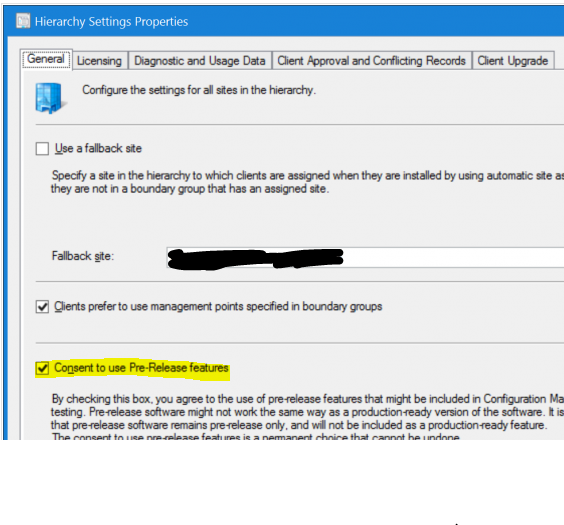
So in summary you need to go to Administration - Hierachy Settings and enable "Consent to use pre release functions"
You then need to enable the Run Task Sequence


Restart your console and the changes will apply

Comments

Popular posts from this blog

SCCM Task Sequence Fails on SSD Drives Error Error: 87D00267

If you get the error code  87D00267 in a task sequence when deploying an Operating System it  basically means the machine is unable to talk to the DHCP server. From a bit of investigation it  seems that some machines with SSD's actually boot up into the task sequence quicker than it  gets an IP Address! The get around this problem you need to put some pauses in the task  sequence.  The best way is to put the pause in the task sequence just before the point where it  fails. There is  some further reading into this issue below, the sites credited with links.  Part 1 Source: http://ericsccm2012.blogspot.com.au/2013/04/applications-fail-to-install-on-ssd.html Applications Fail to Install on SSD Drives. We received several of the new Dell Latitude 6430U models with SSD drives.  Very nice laptops in a small case.  Easily found drivers for them and loaded into SCCM.  Started the task sequence on one and all look...
SCCM - Required Application Not Installing to a collection based on an Active Directory Security Group I recently had an issue where I was trying to install Office 2013 as a required application to a collection based on an AD Security group. This would work fine if I was advertising the install as  'available', however when I set as 'required' it would not install and not even show up in Software Centre. After looking through the Monitoring section in SCCM and had a look at the deployment status I noticed it said success however the Message ID was 10040 and the description was "program will not rerun" I managed to fix this by going to the deployment settings for this collection and then going to scheduling and altering the "Rerun behaviour" to always rerun program.

SCCM Query for 64 bit Software

I was recently required to do an audit of Office software for Microsoft licensing and noticed the SCCM WQL queries did not pick up 64 bit installs of Microsoft Office. After a bit of investigation I read that the normal queries which work (as below) only detect 32 bit software installs. Credit to skissinger from my IT forum for this info: http://www.myitforum.com/forums/Queries-for-32bit-amp-64bit-in-addremove-programs-m232862.aspx 32 bit software query: select SMS_R_SYSTEM.ResourceID,SMS_R_SYSTEM.ResourceType,SMS_R_SYSTEM.Name,SMS_R_SYSTEM.SMSUniqueIdentifier,SMS_R_SYSTEM.ResourceDomainORWorkgroup,SMS_R_SYSTEM.Client from SMS_R_System inner join SMS_G_System_ADD_REMOVE_PROGRAMS on SMS_G_System_ADD_REMOVE_PROGRAMS.ResourceID = SMS_R_System.ResourceId where SMS_G_System_ADD_REMOVE_PROGRAMS.DisplayName = "Microsoft Office professional plus 2013" 64 bit software query: It's probably the inner joins; because a x86 box won't have any 64 stuff; so nothing to join ...